Release is the trigger
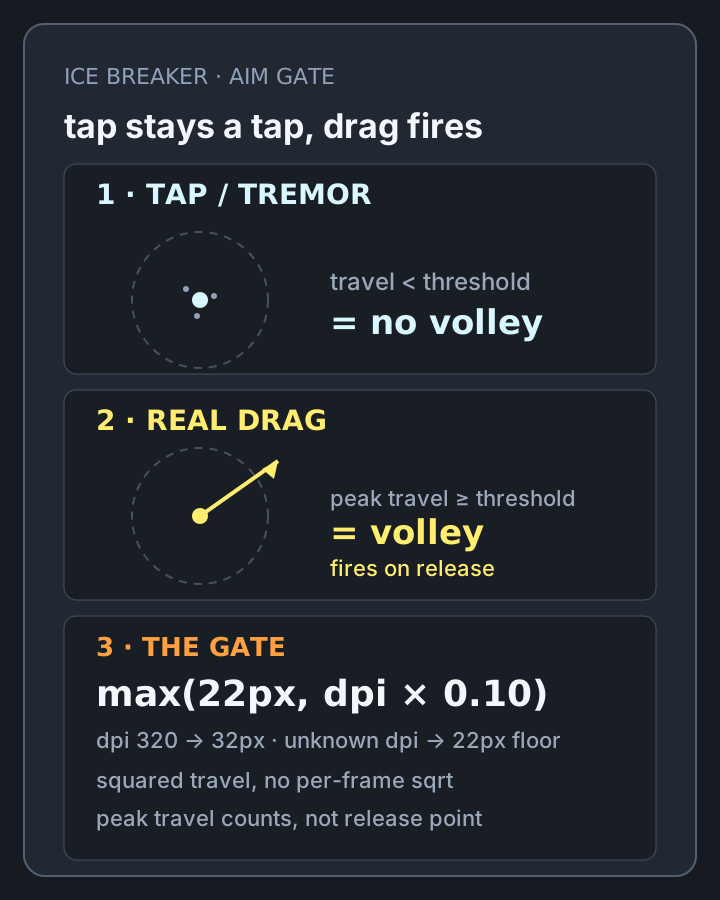
Ice Breaker fires the volley the moment an aim drag is released. A press with a small move, a pocket touch, or a thumb tremor must not become a shot. The release path starts the RunVolley coroutine only when IsMeaningfulAimDrag passes; input that stayed below the threshold just hides the aim dots and does nothing.
A density-scaled pixel threshold
AimDragThresholdPixels sets the gate: max(22px, dpi×0.10). At dpi 320 the threshold is 32px, and an unknown dpi falls back to the 22px floor. A fixed pixel threshold is too large on low-density phones and tremor-sized on high-density ones, so the value scales with screen density and keeps a floor. The linked Unity API page notes that on Android Screen.dpi follows the densityDpi logical bucket rather than an exact measurement, and returns 0 when the DPI cannot be determined. So dpi×0.10 is an estimate of about 0.1 inch from the reported DPI; the 22px floor and per-device DPI error mean it does not guarantee a consistent physical distance.
What the test locks
TinyTapDoesNotQualifyAsAnAimGesture checks the two static functions on both sides of each boundary.
The test covers the threshold math and the gate function only. It does not simulate the real touch input path.
- Threshold value: AimDragThresholdPixels(320) is 32.
- Scaled boundary: squared travel 31² is false and 33² is true at dpi 320.
- Floor boundary: at dpi 0, 21² is false and 23² is true.
What the source adds beyond the test
- Peak travel, not the endpoint: _aimMaxTravelSq keeps the largest squared distance from the press point seen during the drag. A finger that reaches or passes the threshold and returns to the start still counts as a drag.
- Squared compare: maxTravelSq >= threshold² avoids a square root every frame. The linked Vector2.sqrMagnitude page documents that measurement.
- Pinned pointer source: the press prefers touch over mouse, and the release check reads the same pointer source. This covers Android devices where touch also appears as a virtual mouse.
- No aim over UI: IsPointerOverInteractiveUi refuses to start aiming when the press lands on an interactable Selectable.
A sequence to copy in another project
- Decide the travel distance that separates a tap from an intended drag.
- Express it as a dpi-scaled value with a floor for unknown density.
- Track peak squared travel during the drag and compare squared values.
- Pin both sides of the scaled boundary and the floor boundary in tests.
- Keep one pointer source from press to release.
What this record does not prove
The September 8 PlayMode 30/30 receipt and the pinned source were compared on September 21-22. The test locks the boundary of the threshold function only. Whether 0.10 and 22px match real thumb tremor, whether real touch input passes this gate as expected, and whether the UI block works on every device were not verified.
Retained runtime evidence and source review
Verified
Test environmentUnity 6000.5.3f1 · Windows Editor · September 8 retained PlayMode receipts; GameSession input source review on September 21-22
Compared the merged Ice Breaker PR #40 source with the September 8 Unity 6000.5.3f1 PlayMode 30/30 test XML, which contains TinyTapDoesNotQualifyAsAnAimGesture. The author did not rerun the game. Whether the 0.10 and 22px constants match real thumb tremor was not verified on a device.