First prove that Bounce Threshold is the cause
The Unity 6.5 API defines Bounce Threshold as the global Physics 2D value below which relative linear collisions are treated as inelastic. A ball stopping at a wall does not prove this is the cause. Friction, Bounciness, overlapping colliders, sleep, and corner geometry remain separate checks.
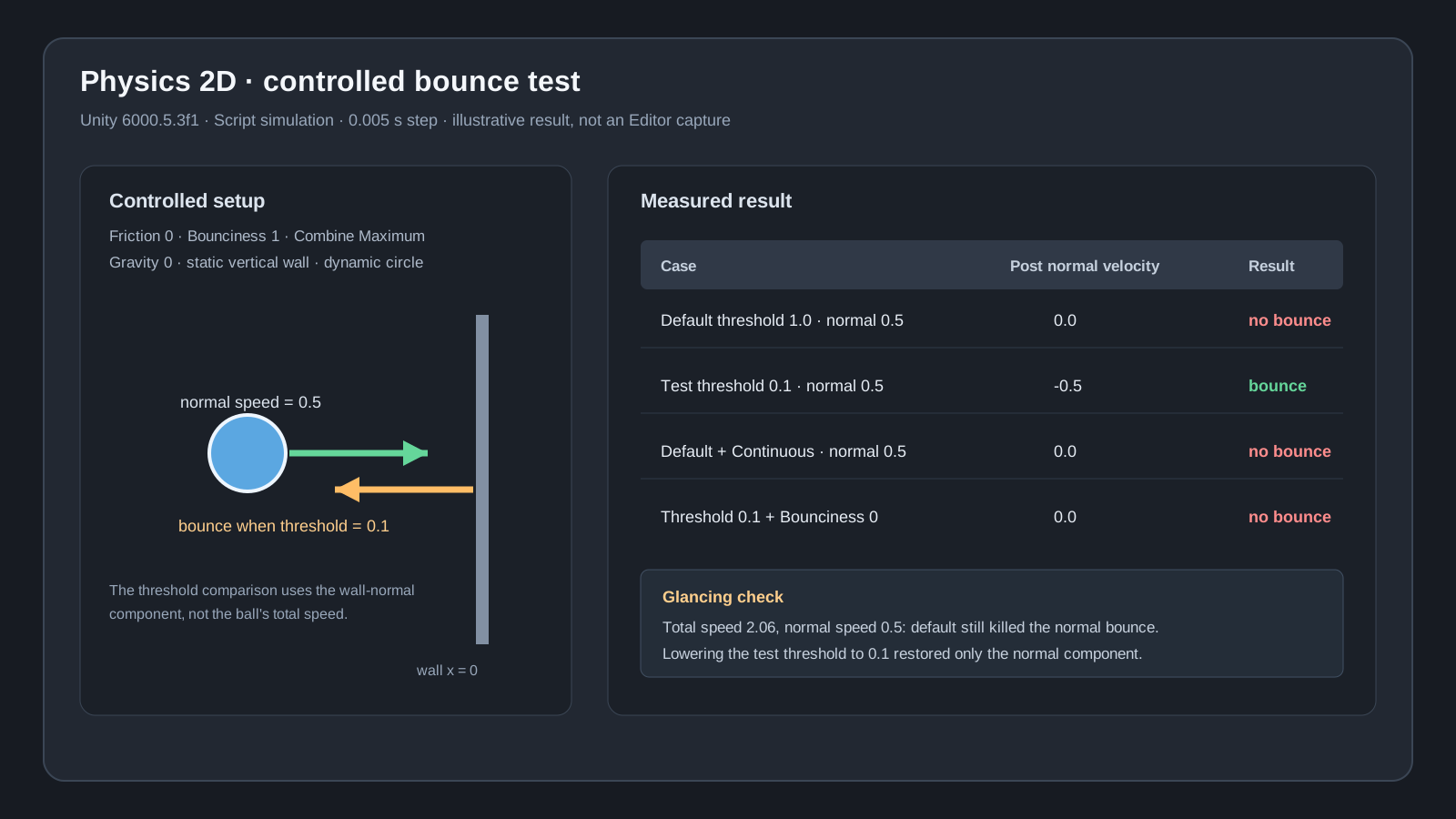
The controlled Unity 6000.5.3f1 project used a vertical wall and a circle with friction 0, Bounciness 1, and Bounce Combine Maximum. The measured default threshold was 1.0. Three independent runs at a scripted 0.005-second step produced the same core result.
default 1.0 · normal speed 0.5 → post-collision 0.0   (no bounce)
test 0.1    · normal speed 0.5 → post-collision -0.5  (full bounce)
default 1.0 · normal speed 2.0 → post-collision -2.0  (full bounce)
Record the contact-normal component, not just total speed
Total ball speed hides glancing failures. The test velocity (0.5, 2.0) had a magnitude of about 2.06, but its component toward the vertical wall was only 0.5. At the default threshold, x became 0 while y stayed at 2.0. At the 0.1 test threshold, x reflected to -0.5.
Attach this temporary probe to the ball and collect the speeds from the real game. Classify corners with multiple contact points separately.
using UnityEngine;

public sealed class BounceProbe2D : MonoBehaviour
{
    private void OnCollisionEnter2D(Collision2D hit)
    {
        if (hit.contactCount == 0) return;

        Vector2 normal = hit.GetContact(0).normal.normalized;
        float normalSpeed = Mathf.Abs(
            Vector2.Dot(hit.relativeVelocity, normal));

        Debug.Log($"normal={normalSpeed:F3}, total={hit.relativeVelocity.magnitude:F3}, contacts={hit.contactCount}");
    }
}
Derive the value from the game instead of copying 0.001
The reproduction used 0.1 because it was below the minimum normal speed of 0.5 that still needed to bounce. It is a test value, not a universal answer. Confirm Friction, Bounciness, and Bounce Combine on both PhysicsMaterial2D assets. Then find the lowest contact-normal speed that should still reflect and test a Bounce Threshold below it in Project Settings > Physics 2D.
If the project sets it in code, apply it before the first scene and keep the measured reason beside the value.
Bounce Threshold is global, so rerun slow landings, stacked boxes, and other low-speed contacts after changing it. The reproduction left Default Contact Offset at 0.01. Contact proximity and the restitution threshold are different controls.
using UnityEngine;

public static class ArcadeBounceSetup
{
    [RuntimeInitializeOnLoadMethod(RuntimeInitializeLoadType.BeforeSceneLoad)]
    private static void ApplyMeasuredThreshold()
    {
        // This game's minimum normal speed that must bounce was 0.5.
        Physics2D.bounceThreshold = 0.1f;
    }
}
Continuous detection and manual Reflect solve different problems
Changing the same low-speed case from Discrete to Continuous left the post-collision speed at 0. Continuous is a collision-detection option for fast motion; it does not turn an inelastic low-speed contact into a bounce.
The ball also failed to bounce with the test threshold at 0.1 when Bounciness was 0. If the design uses engine restitution, do not zero the material and force Vector2.Reflect from the first contact point as a generic patch. A fully custom movement model needs its own handling for multiple contacts, corners, and the fixed simulation step.
Direct reproduction in a real project
Verified
Test environmentUnity 6000.5.3f1 (c2eb47b3a2a9), Windows 10 22H2, empty project, batchmode/nographics/noUpm, Physics2D Script simulation at a 0.005-second step; three independent Editor processes
Repeated seven controlled cases in three independent Editor processes using a static vertical wall and a dynamic circle. At the measured default Bounce Threshold of 1.0, a normal speed of 0.5 became 0; at the test threshold of 0.1, it reflected to -0.5. The run also isolated a 2.06-total-speed glancing hit and Continuous detection, and all three results were identical after removing timestamps.