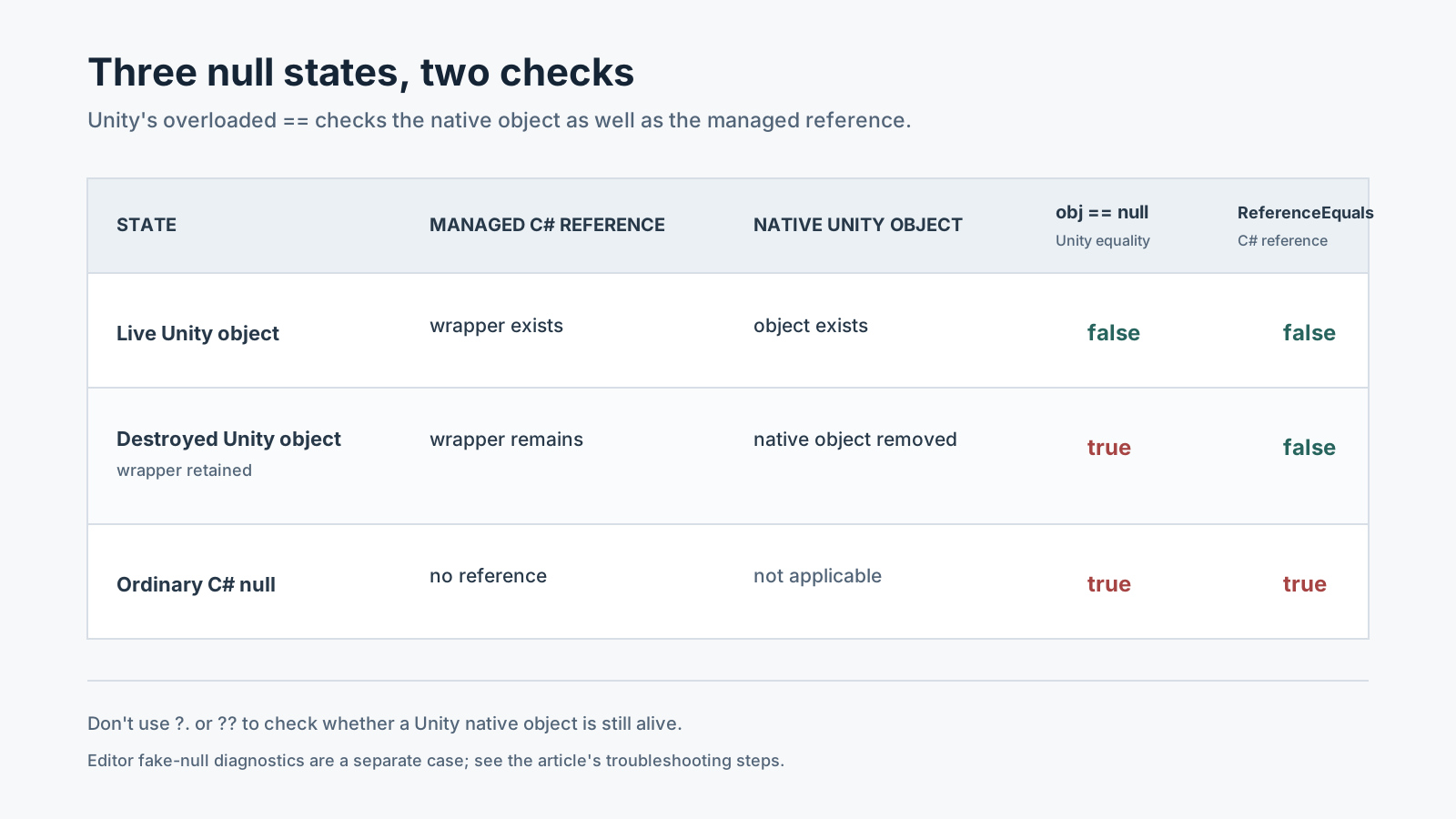
One variable is tied to two object lifetimes
A UnityEngine.Object, such as a GameObject or MonoBehaviour, links a managed C# object to a native Unity object. After Destroy is processed, the native object can be gone while the C# wrapper has not yet been collected. The variable can therefore still hold a C# reference to an object whose Unity counterpart is destroyed.
The Unity 6.0 and 6.6 manuals both explain that == null on UnityEngine.Object treats this state as null. ReferenceEquals and C# null-conditional operators can therefore produce a different result from Unity's equality operator.
Compare both checks in one run
Attach the script below to a new GameObject, assign another scene GameObject to target, and enter Play mode. Destroy is processed after the current Update loop, so the coroutine waits one frame before checking.
After the assigned target is destroyed, saved == null becomes true. While the local variable saved keeps the C# wrapper alive, ReferenceEquals(saved, null) can be false. That difference is evidence that the Unity object has been destroyed. If you leave the Inspector field unassigned, saved == null is also true, so assign target before running this comparison.
using System.Collections;
using UnityEngine;

public sealed class DestroyedReferenceProbe : MonoBehaviour
{
    [SerializeField] private GameObject target;

    private IEnumerator Start()
    {
        GameObject saved = target;
        Destroy(target);
        yield return null;

        Debug.Log($"Unity == null: {saved == null}");
        Debug.Log($"C# ReferenceEquals null: {ReferenceEquals(saved, null)}");

        if (saved == null)
        {
            Debug.Log("Unity object is gone; do not access its members.");
            yield break;
        }

        Debug.Log(saved.name);
    }
}
Do not replace Unity's null check with `?.` or `??`
Unity's manual says C# ?. and ?? do not return the same results as == for types derived from UnityEngine.Object. Those operators check whether the managed reference is null; they do not check the state of the Unity native counterpart. Use Unity's overloaded obj == null check before accessing a Unity object.
// A type derived from UnityEngine.Object
if (target == null)
    return;

target.transform.position = Vector3.zero;
Treat the exception name as a clue, not a complete diagnosis
A NullReferenceException first suggests that code used a member through an actual C# null reference. When a Unity object has been destroyed but its wrapper remains, accessing a Unity API member can produce a MissingReferenceException message. Do not use the exception string alone to classify every Editor and Player case. Check the stack-trace line, where the variable was assigned, obj == null, and ReferenceEquals(obj, null). An unassigned Inspector field or an Editor-only fake-null diagnostic can also compare equal to null.
Fix the lifetime before adding a catch block
Catching NullReferenceException does not extend a destroyed object's lifetime. Prefer cleaning up the reference and exiting safely after Unity's null check.
- Find the Unity object used on the stack-trace line and the last code that assigned the reference.
- Check whether lookup returned an actual C# null or whether
Destroyor a scene transition removed the object. - Check
obj == nullimmediately before use; stop the work or look up a replacement if the object is gone. - If a cache, static field, or event subscription keeps the reference, clear it when the scene ends or the object is released.
- Do not assume an Editor result is identical in a Player. Check a Player error with that build's own stack trace and conditions.
Official documentation review
Verified
The Unity 6.0 and 6.6 UnityEngine.Object and API documentation was compared. The example is documentation-based and was not run in the Unity Editor.