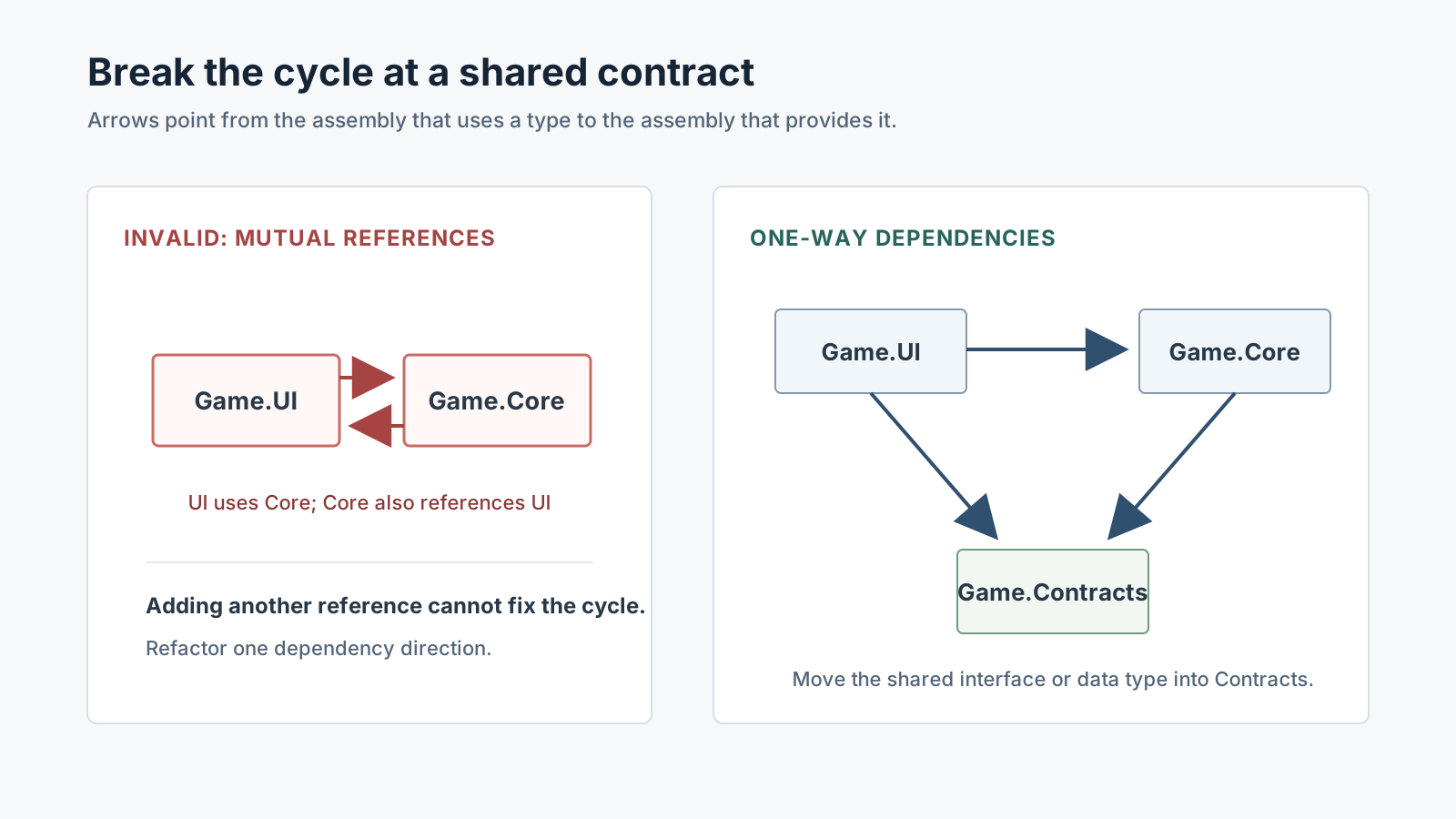
Draw the reference graph before chasing the error text
An asmdef groups scripts in a folder into a separate assembly. If one assembly uses a type from another, the assembly that uses it must reference the assembly that provides it. If both Core → UI and UI → Core exist, the references form a cycle. Adding another reference cannot fix that graph. Unity 6.0 and 6.6 both disallow cyclical assembly references.
Write each asmdef name in a box and draw arrows from the user to the type provider. Often the two assembly names in the first Console error are enough to reveal the cycle.
Game.UI ───────▶ Game.Core
   ▲                 │
   └─────────────────┘  // the reverse reference creates a cycle
For a missing reference, add it to the assembly that uses the type
If code in Game.UI uses InventoryService from Game.Core, Game.UI.asmdef must reference Game.Core. In Unity 6.6, select the Game.UI Assembly Definition, click **+** under **Assembly Definition References** in the Inspector, and choose Game.Core. Do not add the reference backward to the provider just because its name appears in the error.
The snippet demonstrates the dependency direction. In a project, place each script under the folder included by its asmdef and check the compilation result in the Unity Editor.
// Game.Core assembly
namespace Quest.Core
{
    public sealed class InventoryService
    {
        public bool HasItem(string itemId) => itemId == "silver-key";
    }
}

// Game.UI assembly; Game.UI.asmdef references Game.Core
namespace Quest.UI
{
    using Quest.Core;
    public sealed class ChestPanel
    {
        private readonly InventoryService inventory;
        public ChestPanel(InventoryService inventory) => this.inventory = inventory;
        public bool CanOpen() => inventory.HasItem("silver-key");
    }
}
If both sides need each other, extract a contract
When UI uses Core and Core also uses a callback type declared by UI, the responsibilities have become coupled. Move the shared interface or data type into a small assembly such as Game.Contracts, then let both assemblies reference that contract. If the mutually dependent classes belong together, placing them in the same assembly is another option documented by Unity.
Prefer keeping Core unaware of UI while UI calls Core's public API. For callbacks, put an interface in the contract assembly and let Core depend on that interface. If you cannot tell which type to move, first check whether the two features change together.
Game.UI ─────▶ Game.Core
   │               │
   └──────▶ Game.Contracts ◀──────┘

Game.Core ──X──▶ Game.UI   // do not add this edge
Check the Assembly-CSharp boundary
Assembly-CSharp is a predefined assembly created by Unity's folder rules. The Unity 6.0 and 6.6 referencing manuals say a custom asmdef cannot reference a predefined assembly. With the default settings, a predefined assembly can reference asmdefs whose **Auto Referenced** property is enabled. That property does not create references between two custom asmdefs.
So if scripts outside an asmdef can use its types but scripts inside the asmdef cannot find a type left in Assembly-CSharp, check whether your scripts are split across that boundary. Move the shared types under an asmdef or create an explicit contract assembly.
Recheck only the failing reference path
If the names and references look right but a type is still missing, check which asmdef folder contains its script and whether platform restrictions or define constraints exclude that assembly from the current configuration. Do not use **Auto Referenced** as a substitute for an asmdef-to-asmdef reference.
- Record the first asmdef error and the assembly names it mentions.
- Open **Assembly Definition References** for each assembly and write down the actual directions.
- For a missing edge, make the user reference its provider. For a cycle, extract a shared contract, keep one-way dependency, or merge the mutually dependent classes into one assembly.
- Check that no custom asmdef still needs a type from
Assembly-CSharp. - Let Unity compile and confirm that this error is gone; handle the next new error as a separate dependency.
Official documentation review
Verified
The official Unity 6.0 and 6.6 assembly-reference manuals were compared. Examples are documentation-based; no Unity Editor compilation reproduction is included.