Share the asset, not current health
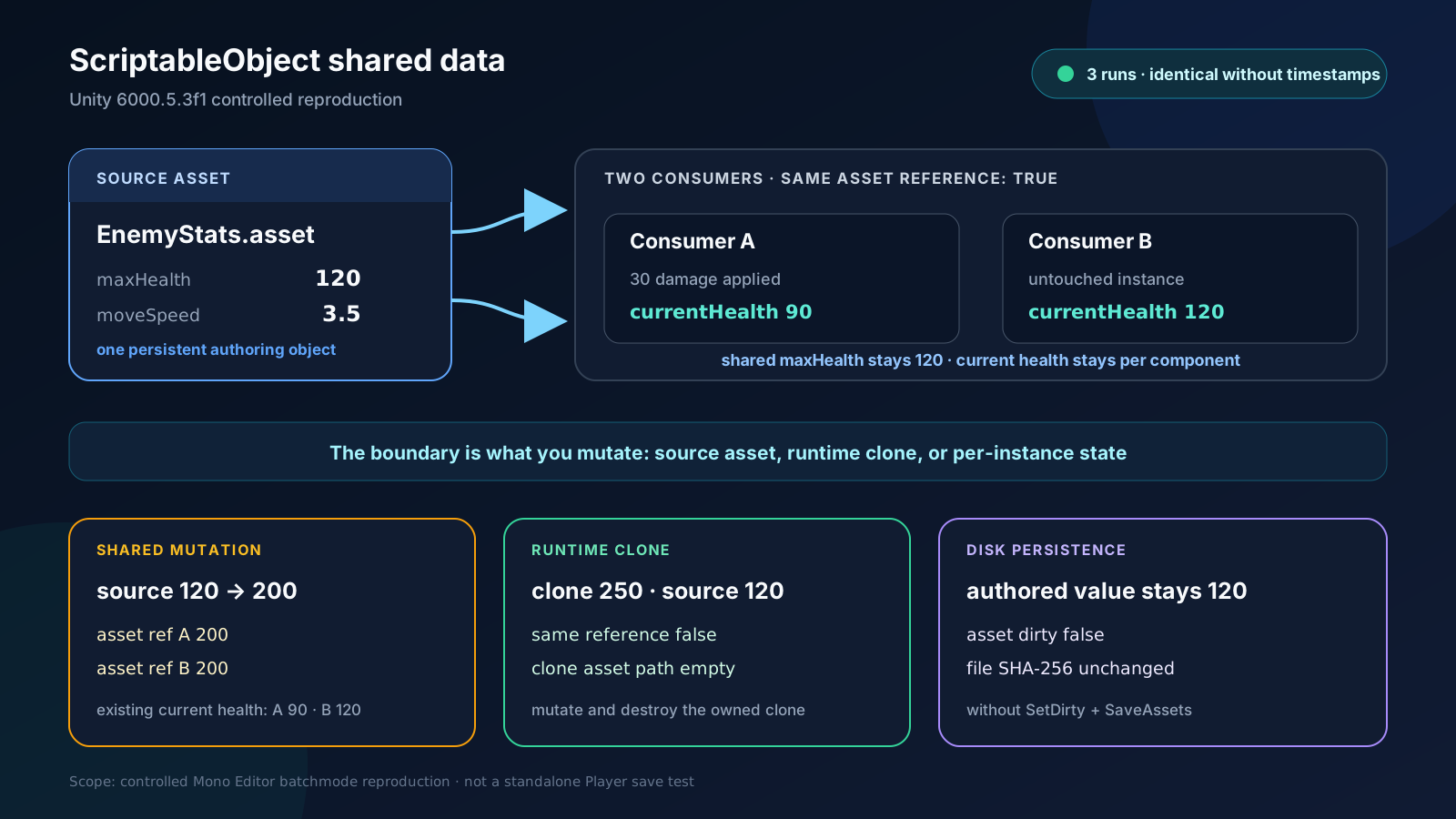
In an empty Unity 6000.5.3f1 project, loading EnemyStats.asset twice returned the same object reference. Both consumers also pointed to that asset. Its maxHealth was 120. After consumer A took 30 damage, A's current health was 90, B's was 120, and the shared default remained 120. Put defaults that many objects read in the ScriptableObject; keep per-instance state such as current health on the component. Create the EnemyStats asset in the Project window, then assign it to the Enemy Prefab's defaults slot.
// EnemyStats.cs
using UnityEngine;

[CreateAssetMenu(fileName = "EnemyStats", menuName = "Game/Enemy Stats")]
public sealed class EnemyStats : ScriptableObject
{
    [Min(1)] public int maxHealth = 120;
    [Min(0f)] public float moveSpeed = 3.5f;
}

// Enemy.cs
public sealed class Enemy : MonoBehaviour
{
    [SerializeField] private EnemyStats defaults;
    public int CurrentHealth { get; private set; }

    private void Awake()
    {
        if (defaults == null)
        {
            Debug.LogError("EnemyStats is not assigned.", this);
            enabled = false;
            return;
        }

        CurrentHealth = defaults.maxHealth;
    }

    public void Damage(int amount)
    {
        CurrentHealth = Mathf.Max(0, CurrentHealth - amount);
    }
}
A source-asset mutation reaches every consumer
Changing the shared asset's maxHealth from 120 to 200 made both asset references read 200 immediately. The already initialized current-health values stayed at 90 and 120 because they lived on the consumers. If Damage reduced defaults.maxHealth instead, one enemy taking a hit would change the default seen by the others.
Do not apply the Prefab rule that every Play Mode edit resets to a ScriptableObject asset. The Unity 6.5 manual says the Editor can save ScriptableObject asset data in both Edit Mode and Play Mode. An Inspector or editor tool can persist asset changes, so the primary fix is to keep session state away from the source asset.
Clone authoring data when a session needs mutable settings
Instantiate(authoringStats) produced a separate reference in the reproduction, and AssetDatabase.GetAssetPath returned an empty string for the clone. Setting the clone's maxHealth to 250 left the source asset and the second asset reference at 120. The AssetDatabase check belongs only to the Editor test, not runtime code.
Share one clone when every consumer should see the same session rules. Create one per consumer when the settings must diverge. A clone starts with the source values at the time of cloning; later edits do not synchronize automatically.
using UnityEngine;

public sealed class SessionRules : MonoBehaviour
{
    [SerializeField] private EnemyStats authoringStats;
    public EnemyStats RuntimeStats { get; private set; }

    private void Awake()
    {
        RuntimeStats = Instantiate(authoringStats);
    }

    public void ApplyDifficulty(int maxHealth)
    {
        RuntimeStats.maxHealth = maxHealth;
    }

    private void OnDestroy()
    {
        if (RuntimeStats != null)
            Destroy(RuntimeStats);
    }
}
In-memory mutation and disk persistence are separate steps
When the reproduction script assigned 200 to the source object, the asset was not dirty and its on-disk SHA-256 stayed at the authored value without SetDirty and SaveAssets. That is an observation about this controlled Editor script path. An editor tool that intentionally persists the change marks the asset with EditorUtility.SetDirty and performs a save step such as AssetDatabase.SaveAssets.
Do not turn that distinction into a player save design. The Unity manual says a deployed Player can read the ScriptableObject data saved into the build but cannot save progress back into the asset. Use a file, PlayerPrefs, a server, or another explicit player-data path.
Direct reproduction in a real project
Verified
Test environmentUnity 6000.5.3f1 (c2eb47b3a2a9), Windows 10 22H2 (10.0.19045) 64-bit, 기존 게임과 분리한 빈 프로젝트, Mono Editor, -batchmode -nographics -noUpm
Directly reproduced shared asset references, per-component current health, propagation from a shared asset mutation, isolation of a runtime clone, and unchanged on-disk data without SetDirty and SaveAssets in three separate Unity 6000.5.3f1 Editor processes. All results were identical after removing timestamps.